
Introduction
AI agents at work are not just better chatbots. They are becoming digital coworkers that can read context, use tools, prepare decisions, and move tasks from intent to execution. That power is useful. However, it also creates a simple problem: most businesses are not ready to let software act like a worker.
A chatbot answers. An agent acts. That difference changes the risk model. If an agent can open a system, draft a reply, update a record, trigger a workflow, or recommend an approval, it needs more than a clever prompt. It needs permission to work.
This is why leaders should treat AI agents like digital coworkers with a work permit. Not a legal document. A practical operating model. Before an agent enters the workflow, the business should know what it is, who owns it, what it can access, when it must ask for approval, and how its actions will be reviewed.
AI agents at work are not normal automation
Traditional automation is usually narrow and predictable. A rule runs when a condition is met. A form triggers a notification. A report is generated at a fixed time. These systems can still fail, but their scope is often clear.
AI agents are different because they work with flexible inputs. They can read a messy request, decide which step comes next, ask for missing information, and use approved tools. That flexibility is the value. It is also the risk.
For example, an agent that prepares a weekly project update may read notes, compare milestones, draft a summary, highlight risks, and ask a manager to approve the final message. That is helpful. But if the same agent can also send the message, change dates, or assign people without approval, the business has created a control problem.
The goal is not to slow down AI adoption. The goal is to make it safe enough to scale. A company that trusts its agents will use them more. A company that treats agents as experiments with no owner will eventually face confusion, bad data, or uncontrolled access.
The work permit model for AI agents
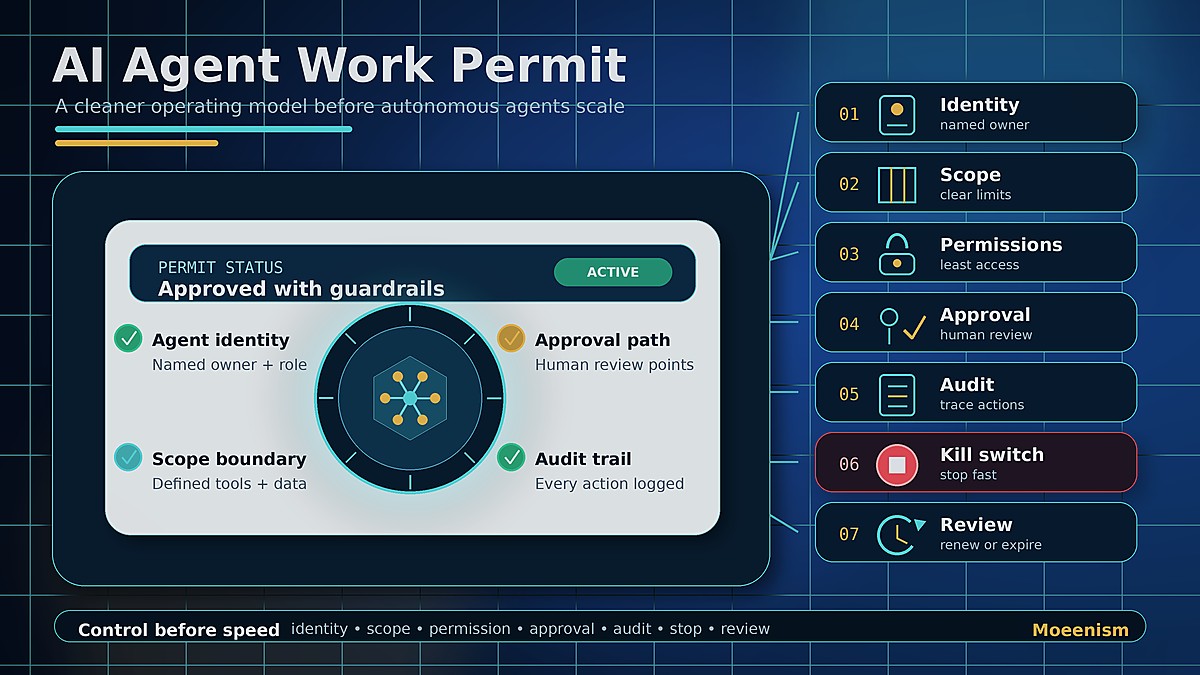
A work permit for an AI agent is a short operating brief. It answers seven questions before the agent is allowed to work inside a business process.
Why businesses need agent identity
Every useful agent needs a clear identity. That does not mean a cute name. It means a defined job. “Help with operations” is too vague. “Prepare a weekly project risk summary for manager review” is better.
Identity gives the agent a boundary. It also helps people know what to expect. If the agent’s job is to gather data and draft a summary, nobody should assume it can approve spending, send final emails, or change system records.
This matters because many AI failures start with unclear expectations. People ask too much from a tool, then blame the tool when it behaves in unexpected ways. Clear identity reduces that risk. It also makes training and measurement easier.
Scope is the real control layer
Scope is where leaders must be strict. An agent should know its allowed tasks, blocked tasks, data limits, and escalation rules. In simple terms, scope tells the agent where the fence is.
For example, a customer-support agent may be allowed to summarize a case and draft a response. However, it may not issue refunds, promise legal terms, or change account status without approval. A finance agent may prepare a variance explanation, but it should not approve payments. A hiring agent may screen public resumes, but it should not make final hiring decisions.
This is not anti-AI. It is basic management. Businesses already define roles for people. Agents need the same discipline, especially because they can move faster than people.
Permissions should be earned, not assumed
The fastest way to create AI risk is to give an agent broad access on day one. Access should be narrow at the start. Then it can expand only when the use case proves stable.
Leaders should apply the same logic used in security: least privilege. Give the agent the minimum data, tools, and actions needed to complete the job. If it only needs to read a dashboard, do not give it edit rights. If it only needs public information, do not connect it to private records. If it only drafts, do not let it send.
This is also where businesses should watch for tool sprawl. An agent connected to too many systems becomes hard to understand. When something goes wrong, nobody knows which input caused the output. Therefore, simple access is safer and easier to improve.
Human checkpoints make agents trustworthy
The strongest agent workflows are not fully autonomous. They are approval-based. The agent does the heavy lifting, then a human decides.
This is especially important for actions that affect money, people, legal risk, reputation, security, or customer commitments. The agent can prepare the facts. It can suggest an option. It can explain the trade-off. But a person should own the final call.
Approval gates also improve adoption. Teams resist black-box automation. They trust systems that show the work, ask at the right moment, and make it easy to approve, edit, or reject.
This is why agent design should include clear checkpoints. Before sending. Before deleting. Before changing a record. Before using sensitive data. Before escalating a case. These checkpoints should be built into the workflow, not buried in a policy document.
Audit trails turn agent work into learning
If an agent acts, it should leave a trail. What was the request? What data did it use? What options did it consider? What did it draft? What did a human approve? What changed after review?
Without this trail, leaders cannot improve the process. They also cannot explain decisions. That becomes a problem when an output is wrong, incomplete, biased, or risky.
Audit trails do more than protect the company. They also reveal friction. If an agent repeatedly asks for missing data, the intake process is weak. If approvals are always delayed, ownership is unclear. If outputs need heavy editing, the prompt or source material is poor.
In other words, AI agents at work are not only task tools. They are process mirrors. They show where the business is unclear.
Start with safe, repeat work
The best first use cases are not the most futuristic. They are the most repetitive and painful. Look for work that happens often, follows known rules, uses several sources, and ends with a clear output.
Good starting points include weekly reporting, meeting follow-ups, policy checks, first-draft proposals, project summaries, onboarding checklists, knowledge base updates, and routine review preparation.
These workflows are useful because they are visible. People can compare the agent’s output with the old process. They can see time saved, quality improved, and friction removed.
By contrast, avoid starting with high-risk judgment. Do not begin with “let an agent run the business.” Begin with “let an agent prepare the work so a person can decide faster.”
A simple 30-day plan
In week one, pick one workflow with visible friction. Map the trigger, inputs, steps, approvals, and final output. Keep the map honest. Include the messy parts, not only the official process.
In week two, split the workflow into four buckets: gather, draft, check, and decide. Agents are usually strong at the first three. Humans should stay close to the fourth.
In week three, build a narrow agent around one outcome. For example, “prepare a Friday project health summary” is better than “manage projects.” Narrow agents are easier to test and trust.
In week four, measure practical results. Did fewer items get stuck? Did managers decide faster? Did output quality improve? Did people understand the process better? If the answer is yes, improve the agent and add one more controlled capability.
Key takeaways
- AI agents at work need clear roles, not vague freedom.
- A work permit model defines identity, owner, scope, permissions, approvals, audit trails, and review cycles.
- Agents should start with narrow, repeat workflows before touching sensitive decisions.
- Human checkpoints are not a weakness. They are how businesses build trust.
- The goal is not to replace judgment. The goal is to remove coordination drag around judgment.
Frequently Asked Questions
What are AI agents at work?
AI agents at work are software systems that can follow goals, read context, use approved tools, and move tasks forward inside defined limits. They are different from simple chatbots because they can support action, not just answer questions.
Why do AI agents need a work permit?
They need a work permit because they may access tools, data, and workflows. The permit defines what they can do, who owns them, when approval is required, and how their actions are reviewed.
Should AI agents make business decisions?
They can prepare decisions, summarize options, and flag risks. However, sensitive decisions involving money, people, reputation, security, or legal risk should stay with accountable humans.
Where should a company start with AI agents?
Start with repeat work that has clear inputs and outputs. Weekly reporting, meeting follow-ups, policy checks, project summaries, and review preparation are good first use cases.
What is the biggest AI agent risk?
The biggest risk is giving agents vague goals and broad access. Narrow scope, least-privilege permissions, human approval gates, and clear logs reduce that risk.
Conclusion
AI agents at work will scale only when trust scales with them. A work-permit model gives leaders a simple way to define identity, scope, permissions, approvals, audit trails, and review cycles before agents touch real workflows.
The point is not to slow AI down. The point is to make agent adoption clear, safe, and useful enough for serious business work.
Useful public references
- NIST AI Risk Management Framework
- OWASP Top 10 for Large Language Model Applications
- OECD AI Principles
For more on this topic, see why AI agents are becoming the new enterprise operating system and how chatbots changed the business landscape.