
Introduction: the add-on nobody owns can become the weakest tool
A browser extension feels small. One person adds it to save time, capture notes, check grammar, manage tabs, or connect a cloud tool. However, the risk is rarely small once the same extension becomes normal across a team. It can read pages, change site data, collect usage, request broad permissions, or keep running after the original need has passed.
The Moeenism position is simple: browser extension safety is an ownership decision, not a personal install preference. A useful extension is not automatically a safe extension. Before a tool spreads across a team, someone should know what it can touch, who approves it, who removes it, and what evidence would make the decision change.
This article gives teams a light review they can actually keep. It is not a full security audit. Instead, it is a practical permit for everyday work, built for managers, team leads, and IT-adjacent owners who need enough control without turning every request into a slow committee.
Key Takeaways
- Browser extensions deserve review because permissions can reach far beyond the visible button in the browser.
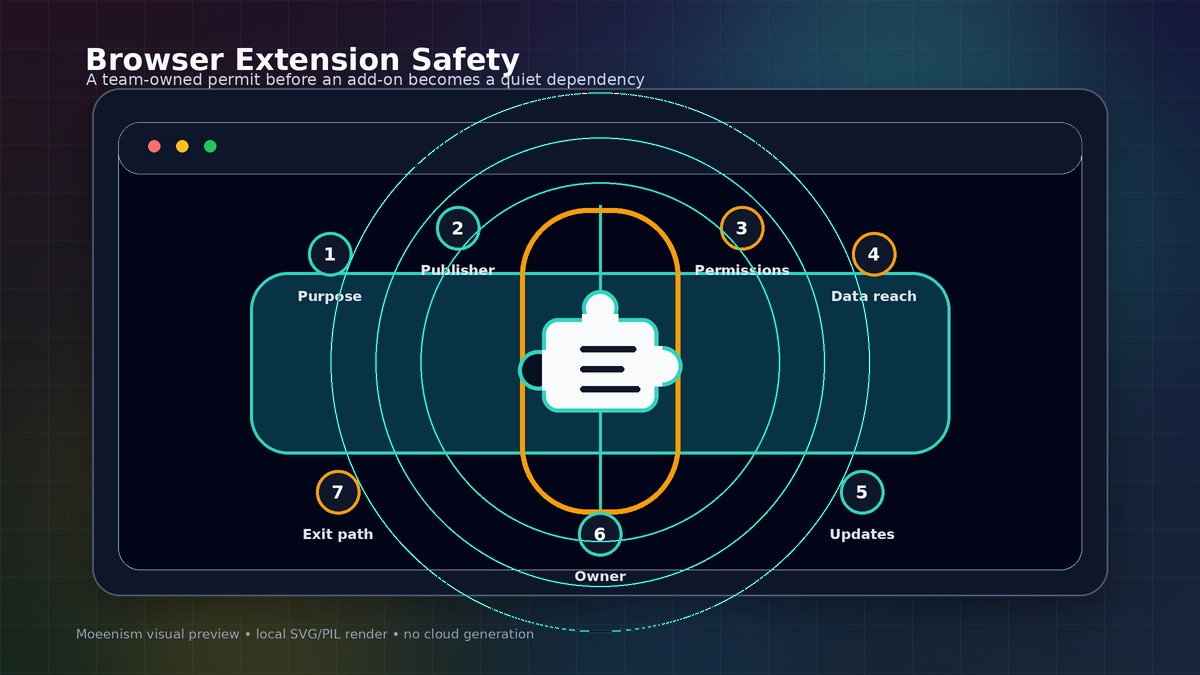
- A safe decision checks purpose, publisher, permissions, data exposure, update behaviour, owner, and exit plan.
- The best rule is not “ban everything.” Instead, require a short permit before a tool becomes team-wide.
- Use extension review with broader habits from security awareness without fear, not with blame or panic.
- If nobody owns the extension after install, the team has not approved a tool. It has accepted an unknown dependency.
What most extension advice misses
Most advice says “install only trusted extensions” or “check reviews.” That is useful, but it is too thin. Reviews can be gamed. A known publisher can change a product. Also, an extension can be safe for one role and risky for another because the data on the page is different.
The missing question is not only, “Is this extension good?” The better question is, “What business information can this extension see or change if a normal user installs it?” That shift matters because a browser is where email, documents, dashboards, finance tools, CRM pages, admin consoles, and AI tools often meet.
Therefore, the review should focus on reach. If an extension can read every website, edit page content, access clipboard data, or connect to an outside account, the decision is bigger than the person who clicked “Add.” It becomes a team risk decision.
The Moeenism browser extension permit
A small team does not need a fifty-page form. It needs a seven-check permit that can be completed before repeated use. The purpose is not to block useful work. The purpose is to make quiet risk visible before the extension becomes part of the operating model.
Keep the rule plain. If an add-on can read every page, slow down. If nobody owns it, do not roll it out. If the value is small, use a safer tool. The review should help work, not punish people.
| Risk check | Question to answer | Decision rule |
|---|---|---|
| Purpose | What job does this extension do that the browser or approved app cannot do? | Reject vague convenience. Approve only a named work need. |
| Publisher | Who maintains it, and is there a clear support and privacy trail? | Prefer known vendors, active maintenance, and clear policies. |
| Permissions | Can it read, change, or collect data from all sites or only a narrow set? | Broad access needs a stronger reason and owner approval. |
| Data exposure | Could it see customer, employee, payment, identity, or confidential work content? | If sensitive data is visible, default to deny until reviewed. |
| Update behaviour | How will the team notice permission changes, ownership changes, or risky updates? | Set a review date and watch for permission drift. |
| Owner | Who answers if the extension causes trouble or needs removal? | No named owner means no team-wide approval. |
| Exit path | How will users remove it, revoke access, and switch if the tool becomes unsafe? | Approve only when removal is practical and documented. |
How to use the seven checks without slowing real work
Start with the work need, not the tool name
If a person asks for an extension, ask what task it improves. For example, “summarize long pages” is clearer than “install this AI add-on.” A clear task lets the team compare safer options. Sometimes the approved browser, password manager, document tool, or existing platform can solve the same problem with less exposure.
Treat broad permissions as a decision point
Chrome and other browser stores warn users when extensions request powerful permissions. However, many people click through warnings because they want the tool to work. That is why the team rule should be simple: broad access needs an owner and a reason. If the extension can read and change data on many sites, it should not be approved by habit.
Connect the check to account and sign-in safety
Extensions live close to the accounts people use all day. Therefore, extension review should sit near identity hygiene. If the team is already improving Microsoft 365 sign-in safety, extension permissions belong in the same conversation. The point is trust, not just login access.
Record the decision where people can find it
A decision that lives only in chat will be forgotten. Instead, record the extension name, purpose, permission level, owner, review date, and removal steps in a small decision log. Moeenism has already argued for this habit in simple decision logs for digital teams. Browser extensions are a good place to practice it because the decision is small, repeatable, and easy to lose.
When an extension should be rejected or escalated
Not every extension needs the same review. Still, a few signs should stop the install until someone checks properly.
- The extension asks to read or change data on all websites, but the work need is narrow.
- The publisher is unclear, inactive, recently changed, or has weak support information.
- The privacy policy is missing, vague, or does not explain data sharing in plain language.
- The extension would run on pages that include passwords, admin consoles, finance data, customer records, or internal documents.
- The team cannot explain how to remove it, revoke access, or notify users if the extension changes behaviour.
As a result, the safest answer may be “not yet,” not “never.” Ask for a safer alternative, a narrow permission setting, a pilot with one low-risk workflow, or a different approved tool.
What leaders should not do
Do not turn extension safety into a blame exercise. People install tools because they want to work faster. If the only policy is “do not install risky extensions,” the team will either ignore the rule or hide the behaviour.
Also, do not approve extensions forever. A tool can be safe today and questionable later. Ownership can change, permissions can expand, and the team’s data can become more sensitive. Therefore, a review date matters.
Finally, do not treat this as only an IT issue. Team leads know the work context. IT or security teams know the control options. The best decision uses both. That is the same practical pattern behind smart cybersecurity steps for UAE businesses: make the safe action simple enough to repeat.
Frequently Asked Questions
Are all browser extensions risky?
No. Many extensions are useful and well maintained. The risk comes from unnecessary permissions, unclear ownership, weak privacy practices, or use on sensitive work pages. Review the reach before the team normalizes the tool.
Should small teams ban browser extensions completely?
Usually no. A total ban can push people toward workarounds. A better starting point is a short permit for team-wide use, stricter review for broad permissions, and a removal process when the tool is no longer needed.
How often should approved extensions be reviewed?
For normal tools, review every quarter or when permissions, publisher, data use, or business context changes. For extensions touching sensitive systems, review more often or use managed browser controls where available.
Sources
- Chrome Extensions documentation on permission warnings
- MDN WebExtensions permissions documentation
- CISA cybersecurity best practices
- FTC cybersecurity guidance for small businesses
Conclusion
Browser extension safety is not about blocking helpful tools. It is about refusing silent dependencies. If a team can name the purpose, publisher, permissions, data exposure, owner, review date, and exit path, it can make a calm decision. If it cannot, the extension is not ready for team-wide use.
The next safe action is small: pick the ten most common extensions in the team, run this seven-check permit, remove what nobody owns, and record the few tools that truly deserve trust.