
Introduction
Software update safety is usually framed as a reminder problem. Turn on automatic updates. Patch quickly. Do not ignore warnings. That advice is correct, but it misses the part that breaks in small teams: nobody owns the decision when an update feels inconvenient, risky, or poorly timed.
A team can know that updates matter and still delay them for weeks. One person fears downtime. Another assumes IT will handle it. A third waits because a key tool is busy. Therefore, the real issue is not awareness. The issue is ownership.
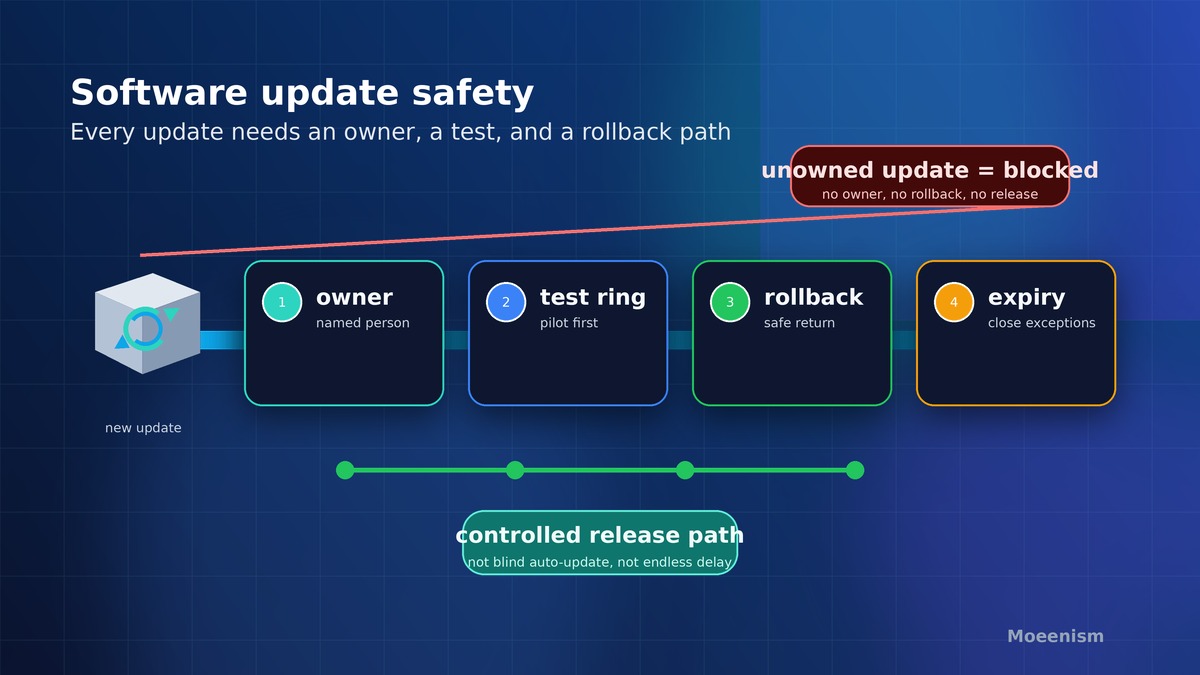
Moeenism’s view is simple: software update safety improves when every important tool has a named owner, a risk rank, a test path, and a rollback note. Without that, updates become background noise. With it, updates become a small operating habit the team can keep.
What Standard Update Advice Gets Right
Public cyber guidance is clear about one thing. Updates reduce known risk. The UK National Cyber Security Centre tells users to install the latest software and app updates because updates often fix security problems. NIST’s small business guidance also treats basic cyber hygiene as a practical duty, not a specialist luxury.
However, standard advice often speaks to individuals or mature IT teams. Many small teams sit in the middle. They use laptops, phones, browsers, cloud apps, plug-ins, and shared tools, but they may not have a full patch process. As a result, updates happen when a prompt appears, when a device restarts, or when something already feels wrong.
That is why reminders are not enough. A reminder asks a person to act. An ownership model tells the team who decides, what matters first, and how to move without guesswork.
The Hidden Cost of Waiting
A delayed update can create more than technical risk. It can slow work, confuse support, and make every future change harder. If nobody knows which devices or apps are behind, a simple update becomes a small investigation.
For example, a browser update may fix a security issue, but it may also affect an extension that several people use. A finance tool update may require a new login flow. A laptop update may need a restart during a busy week. These are normal trade-offs. Still, they should be managed as decisions, not avoided as annoyances.
Before a team delays an update, it should be able to answer four plain questions: what is exposed, who owns the tool, what could break, and when will the delay be reviewed? If those answers are missing, the delay is not a plan. It is drift.
The Moeenism Update Ownership Map
The practical fix is a short map. It does not need heavy tooling. It only needs enough structure to stop important updates from becoming invisible. Therefore, Luna’s in-content visual for this draft is a responsive ownership table that turns a vague update reminder into a decision record.
How to Rank Updates Without Panic
Speed matters, but panic creates poor decisions. A small team needs a calm ranking habit. Start with exposure. If the tool touches sign-ins, payments, customer-facing pages, shared files, or administrator access, treat the update as higher priority. If it is a low-risk feature patch for a rarely used tool, it may wait for the next planned window.
Next, look at ease. If the update is automatic, tested, and reversible, there is little reason to delay. However, if it changes a core workflow, schedule a short test first. The answer is not “patch everything instantly” or “wait until nothing can break.” The answer is to make the risk visible and choose a time.
Teams should also separate personal devices from team dependencies. A single laptop update may be a personal task. A shared browser, extension, cloud app, or admin console is different. When a tool affects many people, one person’s convenience can become a team risk. That is why the owner must be named.
Where Software Update Safety Connects to Other Habits
Update ownership works best when it connects to existing safety habits. For sign-in systems, pair it with Microsoft 365 sign-in safety, because outdated apps and weak identity controls often create a wider attack surface. For people habits, link it with security awareness without fear, because the goal is calm reporting, not blame.
It also connects to browser governance. If a team already reviews browser extension safety, add update status to that review. Before a risky plug-in stays installed, ask whether it is still maintained and who owns it. Finally, record update delays in a simple decision log. A short note can prevent the same debate from repeating next month.
What Leaders Should Ask Each Month
A leader does not need to inspect every device. Instead, the leader should ask better questions. Which important tools are behind? Which exceptions are still open? Which updates need a test window? Which tool has no owner? Which delay would hurt us most if a known weakness were used tomorrow?
These questions change the culture. The update conversation moves from blame to evidence. It also makes trade-offs acceptable. Sometimes an update must wait because a busy period is real. However, a delayed update should have an owner, a reason, and a review date. That is the difference between a managed exception and quiet neglect.
Common Mistakes to Avoid
Mistake 1: Treating automatic updates as full governance
Automatic updates help, but they do not answer every ownership question. Some tools need admin approval. Some updates require restart timing. Some services need change notes. Therefore, automatic updates should support ownership, not replace it.
Mistake 2: Waiting for perfect certainty
No team gets perfect certainty before every update. Instead, use a small test. Check the critical workflow, record the result, and move. If the test fails, the team has evidence. If it passes, the delay should end.
Mistake 3: Forgetting old exceptions
Exceptions often start with a good reason. They become dangerous when nobody returns to them. Put every delay on a review date. If nobody can defend the delay later, close it.
Key Takeaways
- Software update safety is an ownership problem, not only a reminder problem.
- Every important tool needs a named owner, urgency rank, test path, rollback note, and exception expiry.
- Delays can be valid, but only when the reason and review date are visible.
- Small teams should connect updates to sign-in safety, extension reviews, awareness, and decision logs.
- The aim is calm control, not panic patching or endless postponement.
Frequently Asked Questions
Should small teams install every update immediately?
No. Many updates should be installed quickly, especially security updates for exposed tools. However, some changes need a short test or a planned window. The key is to record who owns the decision and when the delay ends.
Who should own software update safety?
The owner should be close enough to the tool to test it and senior enough to escalate risk. In a small team, that may be an operations lead, a technical lead, or a tool owner. The title matters less than the accountability.
What if an update breaks something important?
That is why the test path and rollback note exist. Before delaying every update out of fear, test the one workflow that matters most. If the update breaks it, record the result and choose a safer window or support path.
How often should update exceptions be reviewed?
Review high-risk exceptions weekly and lower-risk exceptions monthly. If an exception keeps rolling forward, it needs a stronger reason or a fix plan.
Sources
- NIST Small Business Cybersecurity Basics
- NCSC guidance on installing software and app updates
- NCSC vulnerability management guidance
- Microsoft Learn guide to Windows update tools and channels
Conclusion
Software update safety becomes easier when the team stops treating updates as random pop-ups. A reminder can be ignored. An owner, a test, a reason, and a review date are harder to lose. Start with the ten tools that matter most. Give each one an owner. Then turn the next update from a nuisance into a controlled decision.