Vendor access helps daily work move faster. Support partners fix issues, consultants guide projects, SaaS providers manage tools, and cloud vendors keep services running. However, vendor access safety needs a simple process. Without one, a temporary account, shared folder, or app permission can stay active long after the work is finished.
The aim is not to block vendors or slow business teams down. Instead, the aim is to give the right access, to the right person, for the right reason, and for the right time. This approach protects company data while still helping trusted partners do their work.
Why Vendor Access Can Become Risky
Most companies now depend on external partners. A vendor may need access to Microsoft 365, ERP systems, reporting dashboards, cloud portals, websites, helpdesk tools, or shared project files. Sometimes the access is needed for one support call. At other times, it supports a long-term service agreement.
The risk usually appears when access is wider than required, approved too quickly, shared informally, or forgotten after the job is complete. For example, a support partner may need one report but receive access to a full department folder. A consultant may need temporary access for a rollout, but the account remains active for months. Also, a third-party app may request broad permissions even though the business only needs one feature.
These issues are common, but they are avoidable with a few smart rules.
Start With a Clear Business Reason
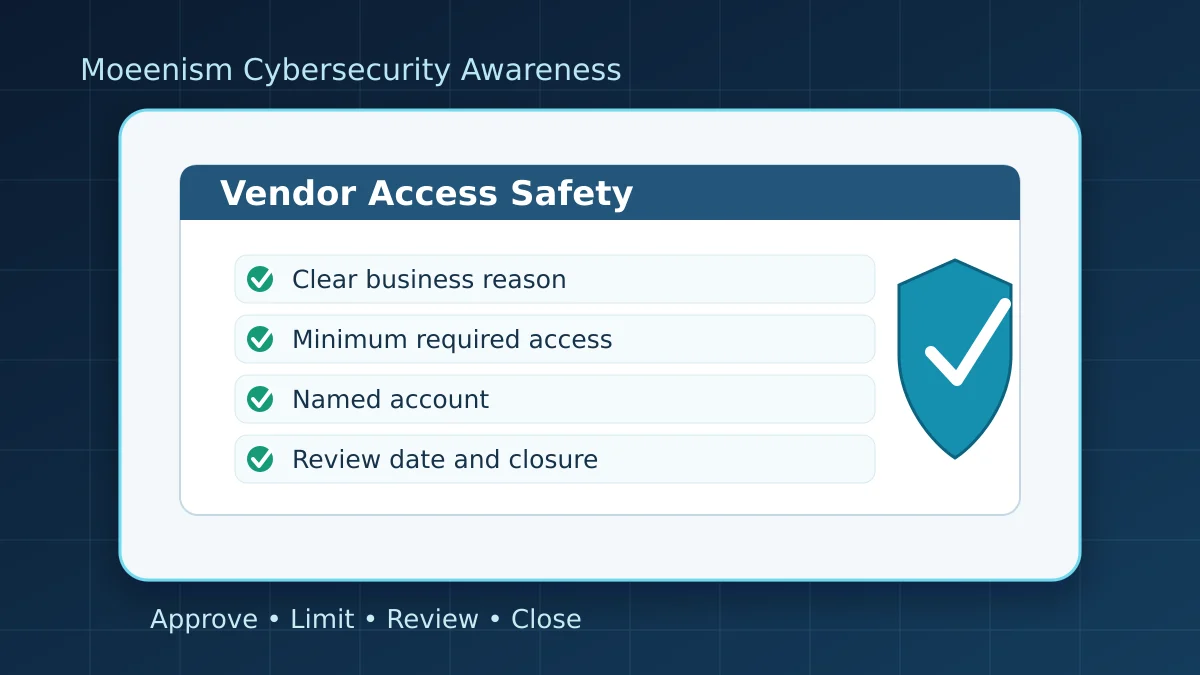
Before any vendor receives access, confirm the business reason in plain language. This step should be simple enough for IT, the business owner, and management to understand.
- What work does the vendor need to complete?
- Which system, file, report, or portal is required?
- Who approved the request?
- Who owns the vendor relationship inside the business?
- How long should the access remain active?
If the reason is unclear, the request should go back for clarification. Clear purpose is the first safety control.
Give Only the Access Needed
Vendor access should follow least privilege. In simple terms, the vendor should receive only the access needed to complete the approved task. If read-only access is enough, do not provide edit access. If one folder is enough, do not provide the full shared drive. If a consultant only needs project documents, admin rights should not be granted.
This rule protects both the business and the vendor. It reduces accidental changes, limits data exposure, and makes troubleshooting easier when something goes wrong.
Avoid Shared Vendor Accounts
Shared accounts create accountability problems. If several people use one login, it becomes difficult to know who performed an action. It also becomes harder to remove access when one person leaves the vendor team.
Where possible, each vendor user should have a named account. The account should use approved authentication controls, and access should match the person’s actual role. This is especially important for finance, HR, customer data, reporting systems, websites, cloud portals, and security tools.
Set a Review Date Before Access Starts
Temporary access should not become permanent by accident. Every vendor request should include an end date or review date. This small habit helps teams check whether the project is still active, whether the vendor still needs access, and whether the account should be disabled.
A review date is useful after projects, audits, migrations, troubleshooting sessions, and contract changes. It also gives IT Operations a clear point to follow up instead of guessing.
Check Third-Party App Permissions
Some vendor tools ask to connect with company accounts, calendars, mailboxes, files, or cloud data. These prompts should not be approved casually. Before approval, review what the app can read, change, delete, or share.
Microsoft provides useful guidance on managing consent requests in Microsoft Entra. The important lesson is straightforward: understand the permission before allowing the connection.
For staff and business teams, the safe habit is to involve IT before connecting third-party tools to company accounts or company data. Do not approve unexpected app permission prompts just because the screen looks official.
Keep Vendor Access Visible
Vendor access should be easy to find during a review. This does not require a complex system. A simple register can record the vendor name, business owner, system, access level, approval reference, start date, review date, and current status.
Visibility helps during audits, renewals, incidents, staff changes, and project closure. If the access is connected to automation or AI tools, it is also worth reading Moeenism’s guide on simple safe automation checks for business teams. Automation can be helpful, but it should not quietly create new access paths without review.
Close Access When Work Ends
Offboarding is just as important as onboarding. When the vendor completes the task, access should be removed, reduced, or moved into a documented support model.
- Disable temporary accounts.
- Remove access to shared folders and portals.
- Revoke unused app permissions.
- Confirm that personal email accounts were not used for business access.
- Check whether any automation, API key, or integration was created.
- Keep a record of what was changed.
For identity-related habits, Moeenism’s article on preventing costly Microsoft 365 sign-ins is also relevant because many access risks begin with weak or poorly reviewed sign-in activity.
Quick Vendor Access Checklist
- Business owner is identified.
- Purpose is clear and approved.
- Access is limited to the required system, folder, report, or role.
- Named accounts are used where possible.
- Multi-factor authentication is required where supported.
- Start date and review date are recorded.
- App permissions are reviewed before approval.
- Vendor access is logged in a simple register.
- Closure steps are planned before work starts.
- IT is involved before third-party tools connect to company data.
What Staff Should Remember
If you receive a vendor access request, an app permission prompt, or a request to share company files, pause and check the purpose. If the request is unusual, urgent, unclear, or wider than expected, ask IT or your manager before proceeding.
Good vendor access management is not about saying no to every request. It is about keeping access clear, limited, approved, reviewed, and closed when it is no longer needed.
Final Thoughts
Vendor access is part of modern work. It supports operations, reporting, finance, websites, cloud systems, cybersecurity, and daily support. However, access should never be informal or forgotten.
A safe process can stay simple: approve the reason, limit the permission, record the owner, review the access, and close it when the work is done. These practical habits protect company data and help trusted partners work safely with the business.
References and Further Reading
- CISA: Supply Chain Risk Management
- NCSC: Assessing supply chain cyber security
- Microsoft Learn: Manage consent requests in Microsoft Entra